
For the past few months, Piinc has been pushing new generative media models to their limits with image and video requests drawn from real creative workflows. Our goal is to evaluate whether models produce truly useful outputs: production-ready assets that need minimal to no further editing. Can these models understand user intentions out of the box, or do they need continuous prodding to reach the intended outcome? We’re not measuring whether outputs are generally likable – we’re assessing whether a model can be a good creative partner. And a good creative partner understands the user’s intentions and acts on them.
For text-to-image workflows, head-to-head preference tests can be misleading (see blog post on the dangers of pairwise preference tests). Each model retrieves high-fidelity examples that fit the brief from its own representational space, so results can differ substantially. The models interpret the brief differently, yet most results look satisfactory, making a model’s utility hard to infer from this type of evaluation.
Consider it like a performance audition. Left to their own creative devices, performers showcase what they do best. But asking every performer to work through the same set of drills starts to expose their breadth of skill, adaptability, and accuracy under different task demands.
Similarly, today’s top-tier foundational models have all “got talent” – they’re past the first audition. To expose their limits, we need to subject them to the equivalent of drills: creative scenarios with specific briefs and clearly defined outcomes. We have a goal and want to evaluate whether we can achieve it with a given model. Without a specific target, how would we know whether the model succeeded?
Take this contextualized marketing workflow: the goal is to adapt a marketing campaign for ski goggles to different ski resorts across the world. We provide the image of a skier wearing goggles, with a ski slope reflected in the lenses, and ask the model to replace the reflection with another recognizable ski destination. Solving this task correctly requires leaving everything else in the first image unchanged, and preserving the pink tint and reflectiveness of the goggles. These properties are part of the object identity, and maintaining identity across images trips up many models. Indeed, models failed in different ways: altering the skier or the goggles, or hallucinating a new mountain in the reflection.
The results below are from Google’s Gemini 3.1 Flash Edit and Meta’s new Muse model. Interestingly, no model was consistent across iterations (not even Muse and Gemini). Most generations looked like the mountain was copy-pasted onto the goggles, hallucinated a different mountain entirely, lost the pink tint, or introduced other unintended changes.
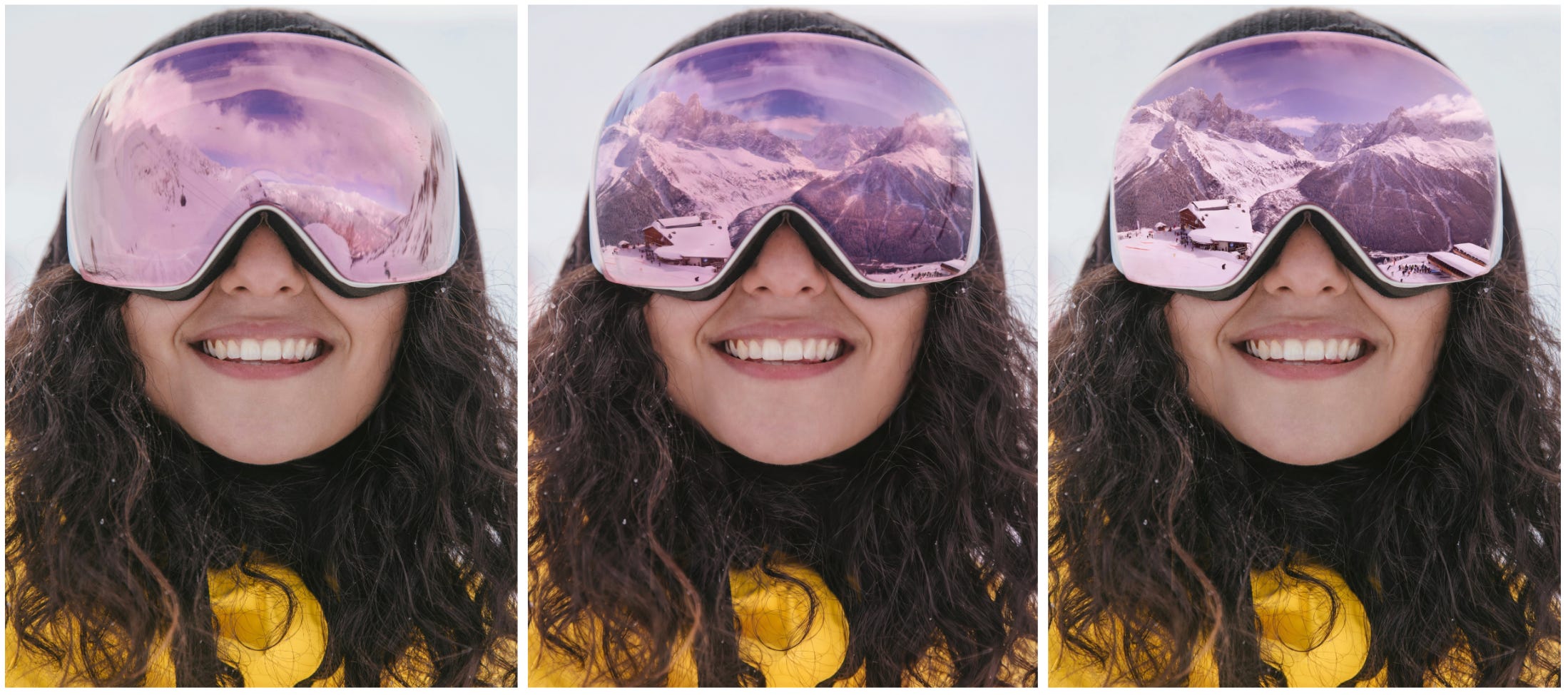
Left to right: Original image, Gemini result, Muse result. Both models were asked to replace the reflection in the goggles with an image of another ski resort provided as a reference image.
Another tricky product photography workflow: virtual photoshoots, a big opportunity for generative AI. When we asked models to place a necklace on different mannequins and people, we again saw a variety of failures. The necklace below is composed of three strands of different lengths, each with a specific arrangement of beads and charms. In the reference photo, it lies flat on a box, so the image alone reveals neither how gravity acts on the necklace nor its scale. The case therefore tests not only identity preservation with small deformable parts, but also physical and size reasoning (world knowledge). The models best at this task were, again, Muse and Gemini 3.1 Flash Edit.
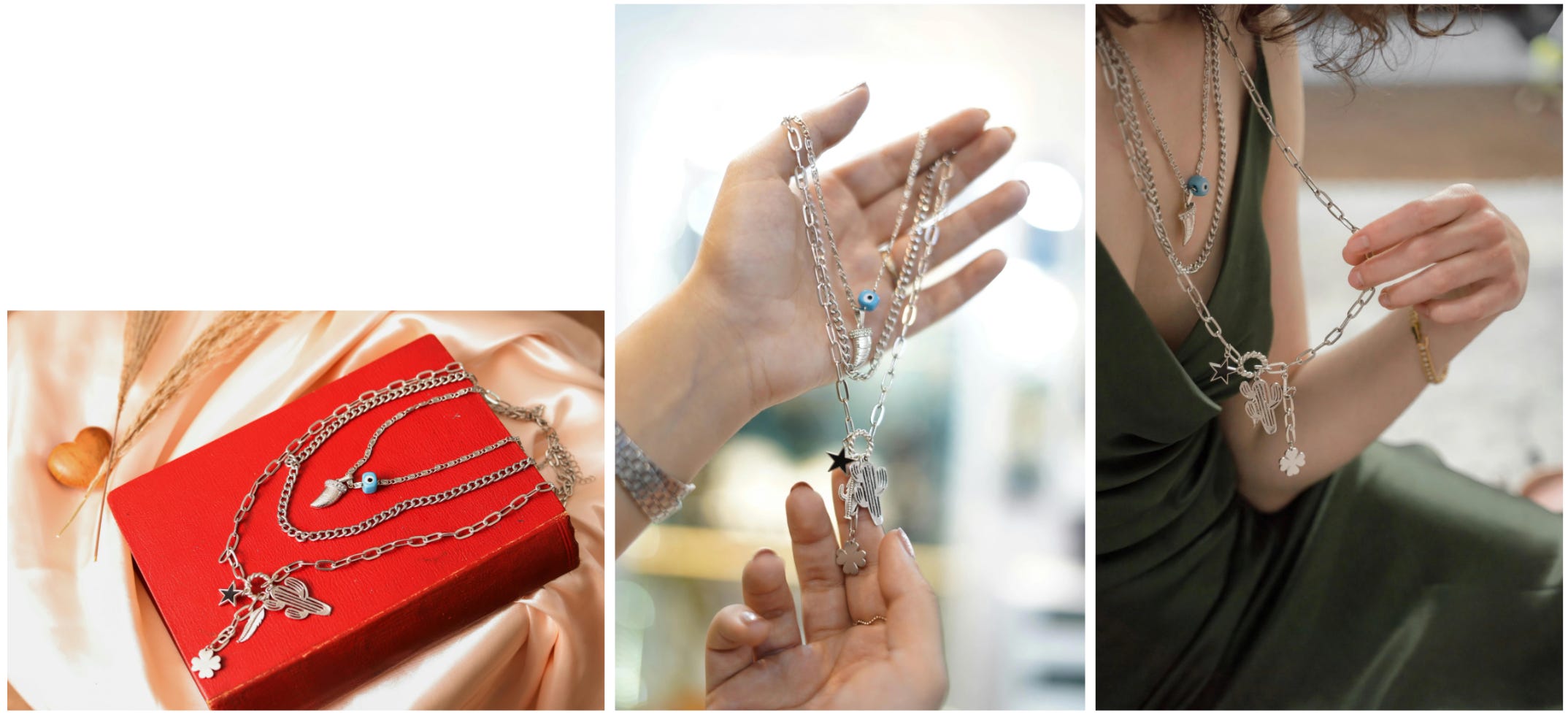
Models are asked to place a necklace into new image scenarios. Here, Muse replaces other necklaces in the middle and last image with the reference necklace from the first image. Note that while the identity of each strand of necklace is maintained, the size of the largest strand is not consistent across images.
Let’s try a case with fewer deformable parts: a watch. The extra challenge here is the need for a model to reason about object scale. Given an image of a watch, Muse was the only model that correctly scaled and placed it in the provided target image. Notice that models must make trade-offs between preserving product identity and seamlessly integrating an object into a new scene, which may require some adjustment and harmonization of the original. Models to date have been notoriously bad at object scale, but Muse stands out here. That said, for luxury goods like watches, attention to detail is instrumental, and all models still have some way to go.
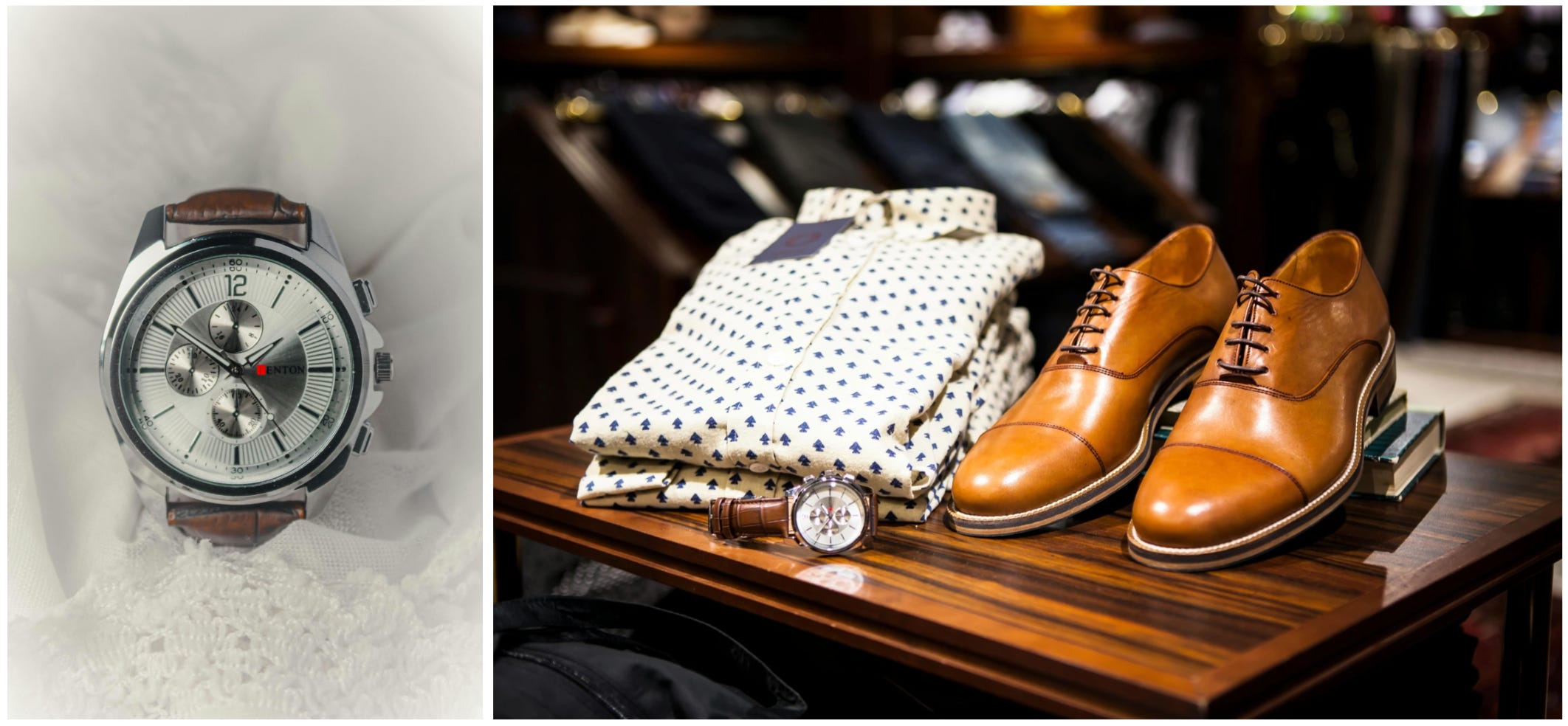
Embedding the watch (left) into a new scene (right) requires not just preserving the identity of the watch, but also correctly inferring its relative scale and reasoning about placement.
Next, we combine product photography with the need to reason about layout. The following two are hard cases for all models: the goal is to place the bottles from one image into the layout specified by a second image. Getting these right requires perfectly preserving the bottles’ identities – testing details, text rendering, and correct object size. Then, because the second image does not map perfectly onto the first (e.g., the number of containers differs), a model must reason how to arrange the bottles to match the intent of the request. With the guidance in the second image, it is very easy (and common) for models to hallucinate new bottle shapes. On these layout cases, we saw the best performances from GPT Image 2 and Muse.
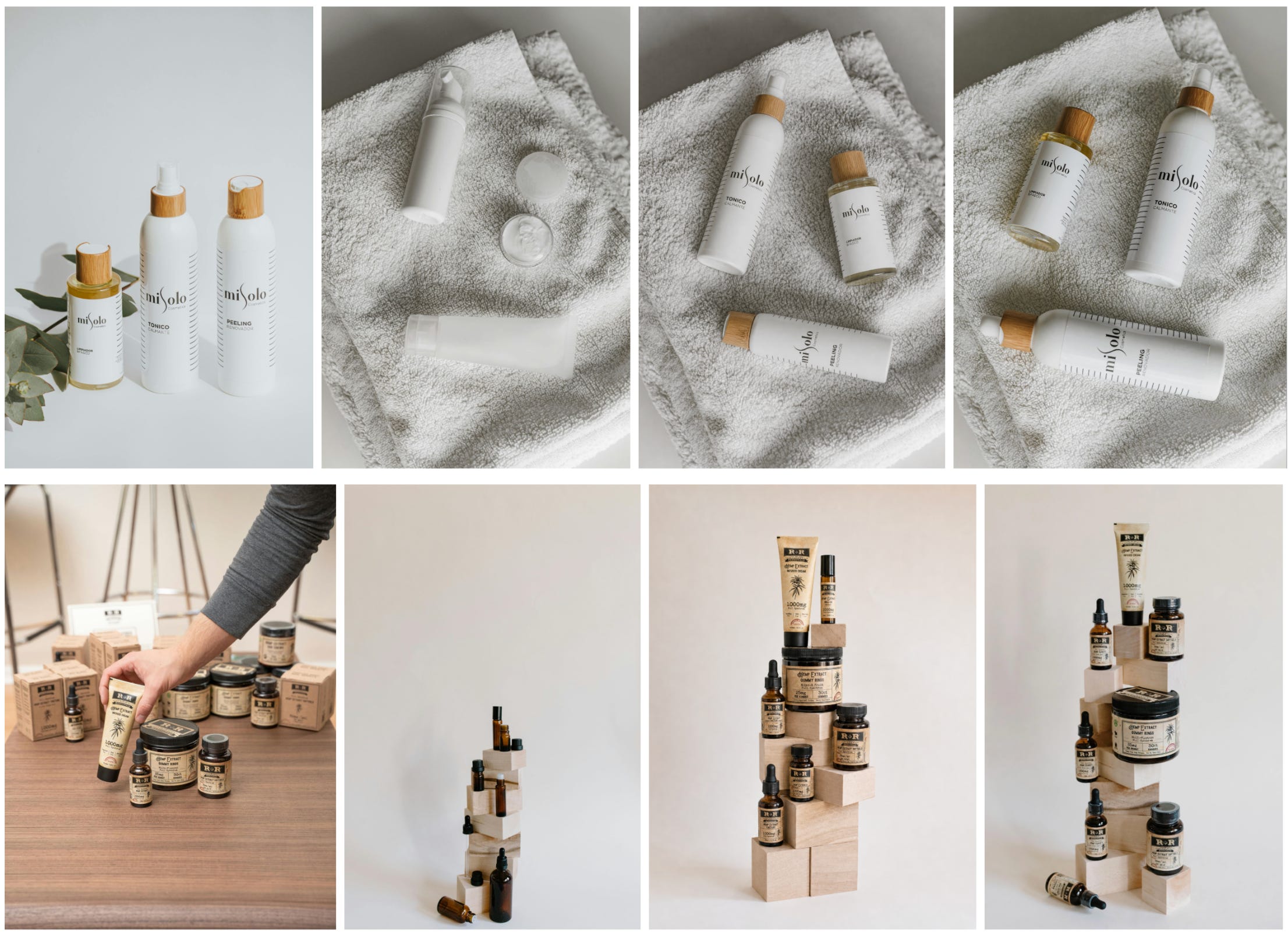
From left to right (both rows): skincare products, layout references, GPT Image 2 result, Muse result. Despite being the most successful results of all models tested, the final outputs are not yet production-ready (artifacts and hallucinations remain and further edits are required).
Now let’s try virtual try-on (VTO) for size. VTO applications take as input an outfit presented as a flat-lay, on a mannequin, or on a person (each with its own challenges) and re-map the outfit onto someone new. There are dedicated VTO models, but the most recent image-to-image models have become competitive on these use cases, particularly shining in their ability to dress people a VTO model has never seen.
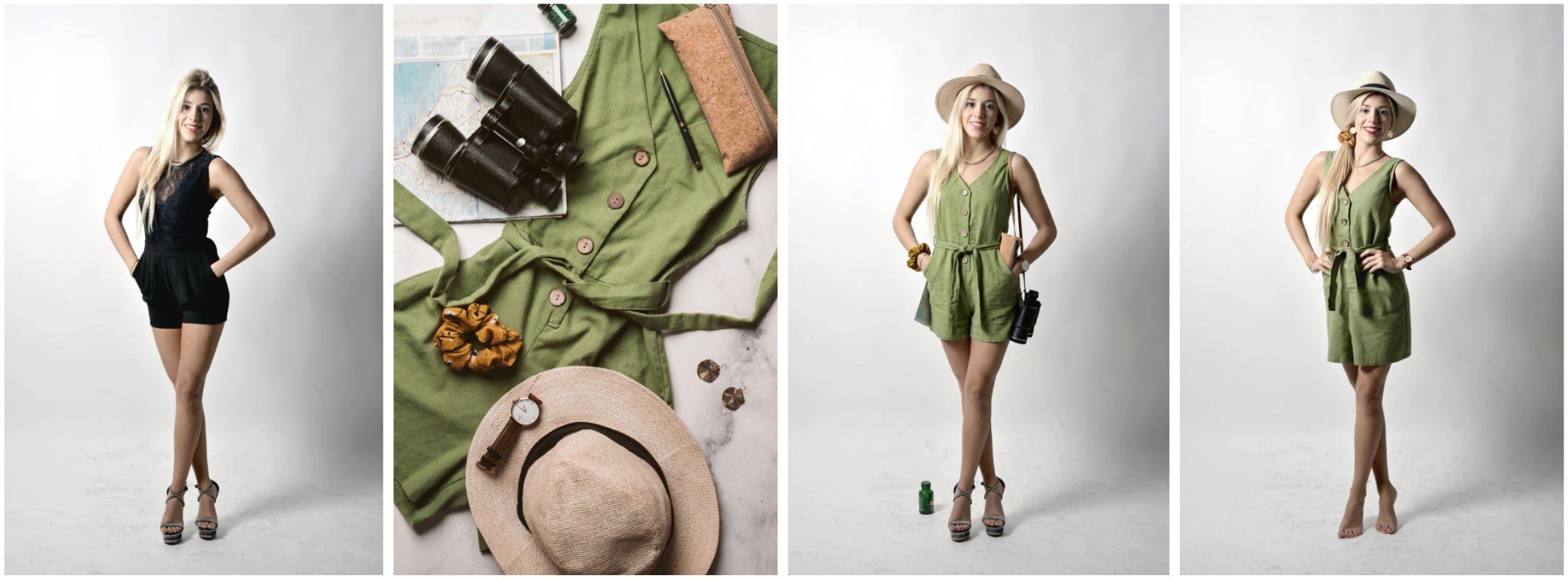
From left to right: the human model, the flat-lay outfit, Gemini 3.1 Flash Edit (keeps the binoculars and the small bag), and Muse (removes the shoes but skips the binoculars and bag). Note how differently the two models use the scrunchie.
To be clear, we are not commenting on the production readiness of Muse or Gemini for VTO. This is an exploratory test of how close image-to-image models can get to dedicated VTO systems at first approximation. VTO deployable in real online retail requires accurate sizing, proportions, and material physics, much of which these models cannot yet deliver. Indeed, models can create garments that don’t exist: the hemming, stitching, pattern, or length may have been quietly adjusted by the generative model. It is a form of hallucination that is hard to spot without a trained eye or genuine intent (e.g., a buyer deciding whether to purchase the garment from an online store).
Virtual staging workflow: we want to place a shelf from a product shot or from a completely different environment (even trickier!) into a new physical space that may be viewed from different vantage points. Accurate composition requires first correctly isolating the object from one image, then reasoning in 3D about spatial placement and proportions to insert it into the second image. All previously tested models broke somewhere: an inaccurately segmented shelf, a shelf or room whose identity wasn’t preserved, new objects hallucinated, or the wrong angle, placement, or relative size for the shelf. Muse is the first model we’ve seen succeed in this complex case.

The two images on the top are used as reference inputs. The two images on the bottom were generated by Muse, asked to place the shelf from the first photo against the back wall in the second photo. Notice that the model preserved the correct elements, while harmonizing the shelf into its new environment. The second result adds the extra challenge of perspective distortion.
As we’ve “auditioned” the models, we’ve been delighted by the recent leaps in progress. But there is no one model to rule them all, especially given the diversity of cases where generative media can be truly useful creative partners. Speed of inference, generation costs, output variability, resolution, and commercial safety all factor into whether a model is the right one for the job. Many of the examples showcased here require reasoning ability, which demands heavier computation. While we deliberately chose particularly challenging cases, for other cases where inputs are more self-contained (e.g., with object scale information or pre-segmented items) and with a smaller leap from input to target output, many more models perform competitively. Designing and running these kinds of intent-driven evaluations is what Piinc does. If you’re deciding which generative models belong in your creative pipeline, or want to understand where they break, get in touch.