
There is no such thing as “the best” generative model for editing. Image editing covers a broad spectrum of tasks with entirely different use cases, and correspondingly, different user expectations. Image editing can cover small image changes, as well as large image transformations. A typical image editing task can entail removing a small defect from an image (a stray background object, a cut-off object at the edge of the image frame, etc.), common tasks photographers regularly do to clean up and polish a photograph by removing distractors and photobombs. The same generative image editing model can be tasked with completely re-imagining a scene, by reposing the people pictured, changing the background, or introducing new content altogether. What users expect of a model in the first case of photo cleanup and in the second case of scene re-generation are entirely different outcomes, and yet the common tendency in model evaluation and benchmarking is to collapse all cases into a single ranked set of models or objective functions.
Models that take too much creative liberty can miss the mark on production workflows. Consider what your reaction would be to an AI model if you gave it a picture of your family on vacation, asking it to remove the tourists in the background, and the model complied, but also changed your child’s face in the process. Or if you asked it to re-imagine what your living room would look like with a different couch, and the model decided to redesign your whole space, subtly showing a distaste for your interior design choices. We would be frustrated with a model that over-reached with its edits. We would provide negative product feedback, and perhaps future versions of the model would be penalized for making any such large changes.
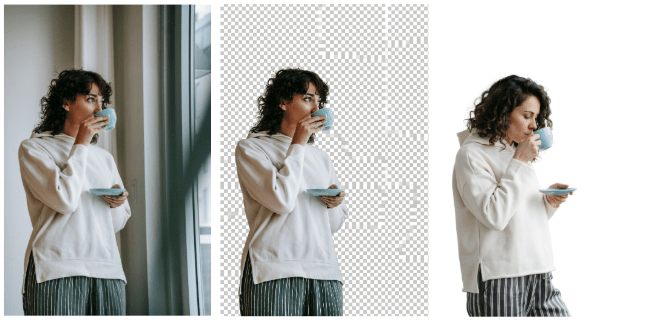
Tasked to “remove the background” in an image, models have diverse behaviors. Some will replace the background with a homogenous color. Others (about a quarter of the models tested) will recognize that executing the request requires transparency, but will output a fake checkerboard pattern, having learned the association between checkerboard patterns and transparency from the training data. The only model in a panel of 15+ models tested on this task that completely removed the background and provided a png result also happened to change the identity of the person pictured (right).
Models that change too little leave their users turning to other tools. Take two: a model has been regularly wrist-slapped for changing too much of a scene, reinforced to preserve object and person identity, image composition, and color profile. It has learned to be “risk-averse”. Tasked with changing the time of day of a scene, or to repose a person, it chokes. It ignores the request, or worse, complies but produces an output that looks like a collage of incompatible image parts, keeping the original images as-is in most regions of the image except for the object that has changed, which now looks out of place. Asking the model to make someone smile, changes the shape of their mouth but keeps the eyes deadpan – a result that will surely evoke an uncanny valley response. Asking the model to make someone hold a different object, replaces the object but fails to reposition the hands to adapt to it.
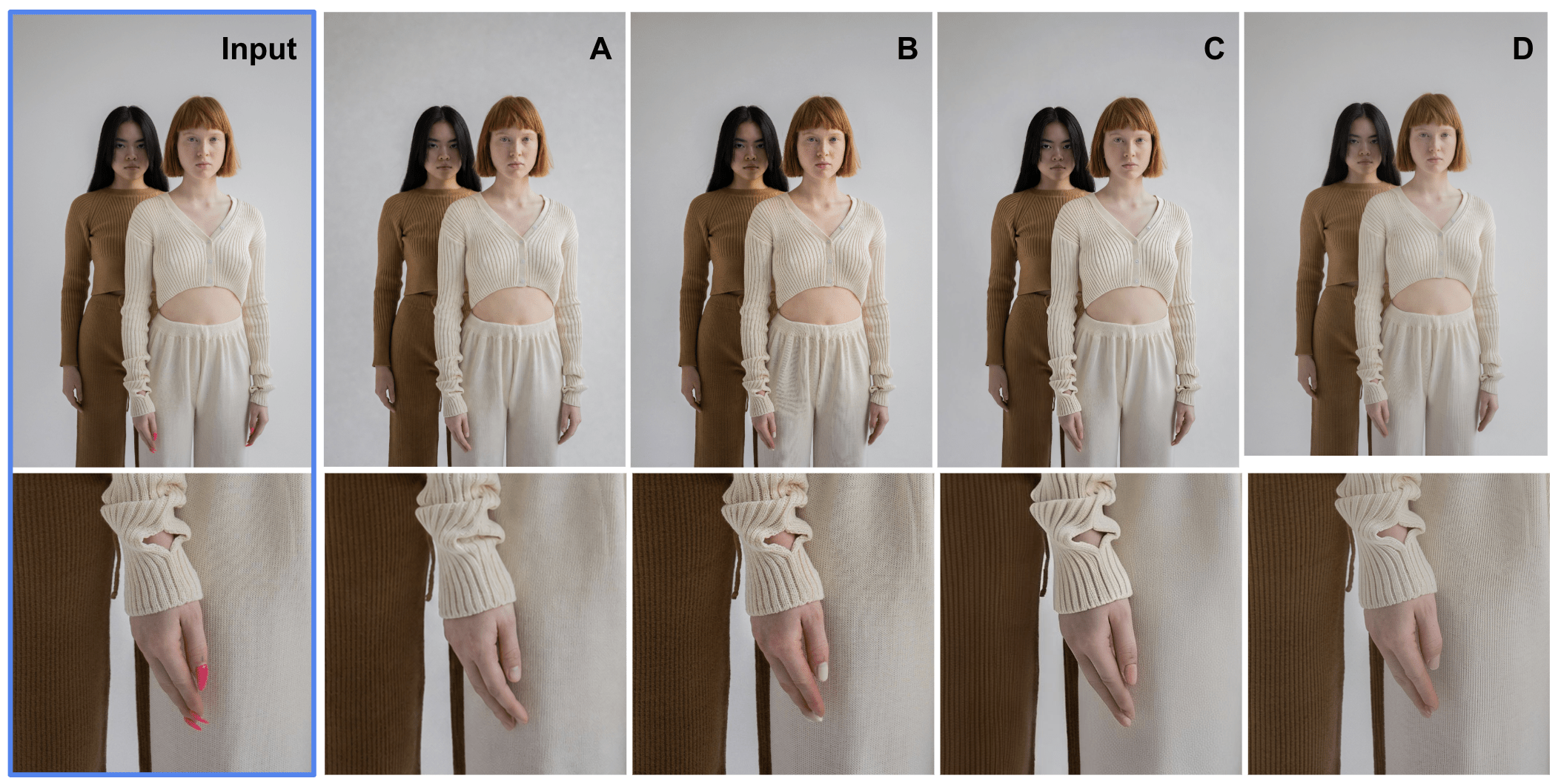
The first image was provided as input to editing models along with the prompt “remove the acrylic nails from the girl in the front. Just make them regular nails, not painted, not long”. The next four outputs depicted are from different models, representing the typical failure modes for this task. A: the nails were correctly edited, but the shirt sleeve was modified in the process; B: the nails were shortened but painted a different color; C: the fingers have been deformed; D: the nails have been completely removed (ouch!). The challenge with this task is that if evaluated at full resolution without attention to these details, the vastly different failures here would have been missed. More consequential is that most of these results would be deemed unusable for real production workflows, meaning that manually editing this photo would have more success than using AI tools.
Solving for everyone solves for no one. Perhaps the model should be smarter: reasoning about your intent to decide if it should change only a few pixels of the image, or take creative liberty, making more visual changes than requested to produce an aesthetically pleasing, well composed, and harmonized result. But what if your intention is not clear to the model? Or your requested edit is incompatible with the scene? Should a model blindly follow your request or act as your creative partner and guide you towards a result that will look polished at the end? There is no right answer to this question – it depends on the user and their use case, so solving for the average – solves for none.
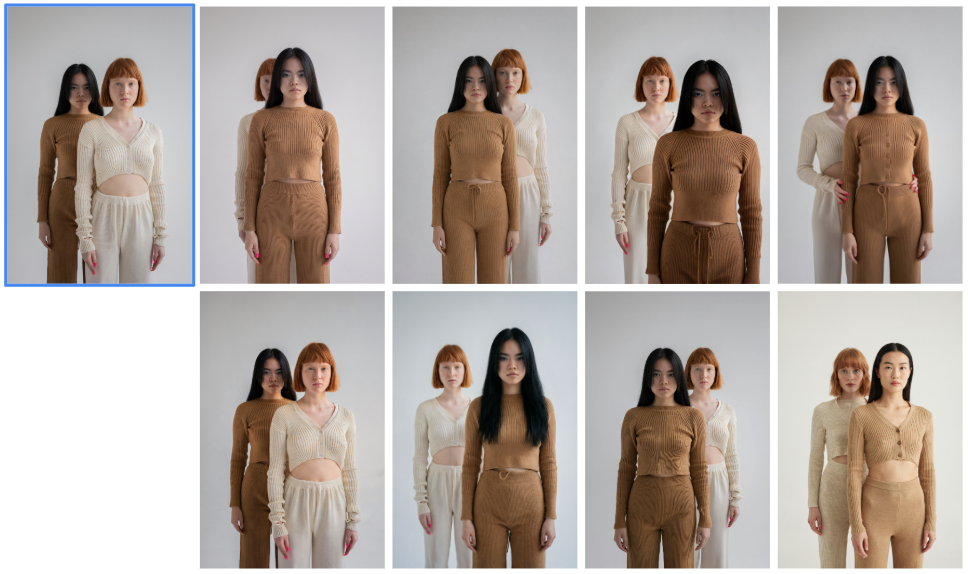
A task for an online fashion catalog. The original image highlighted with a blue frame (top left) was passed to the eight leading AI models pictured here with the editing request “Switch the positions of the girls, putting the one that was behind in front. Keep everything else the same about them.” None of the outputs pictured here are deemed usable.
Same quality, different price. Not all tasks are equally hard for models. For cases where the editing objective is to add, remove, or swap out a clearly-defined object, and the model has enough image context to interpret the editing request without requiring sophisticated (read: expensive) reasoning loops, many models can perform comparatively. Whether or not two models are interchangeable in a creative workflow, depends on whether they are perceptually equivalent. Dedicated human perception evals run at-scale with sufficient rigor can be used to conclude with confidence whether a quality difference will be perceptible to the target audience. As the next example shows, if the output quality is not perceptually different for a specific workflow, then choosing a cheaper image editing model can lead to upwards of 10X cost savings every time that workflow is used.
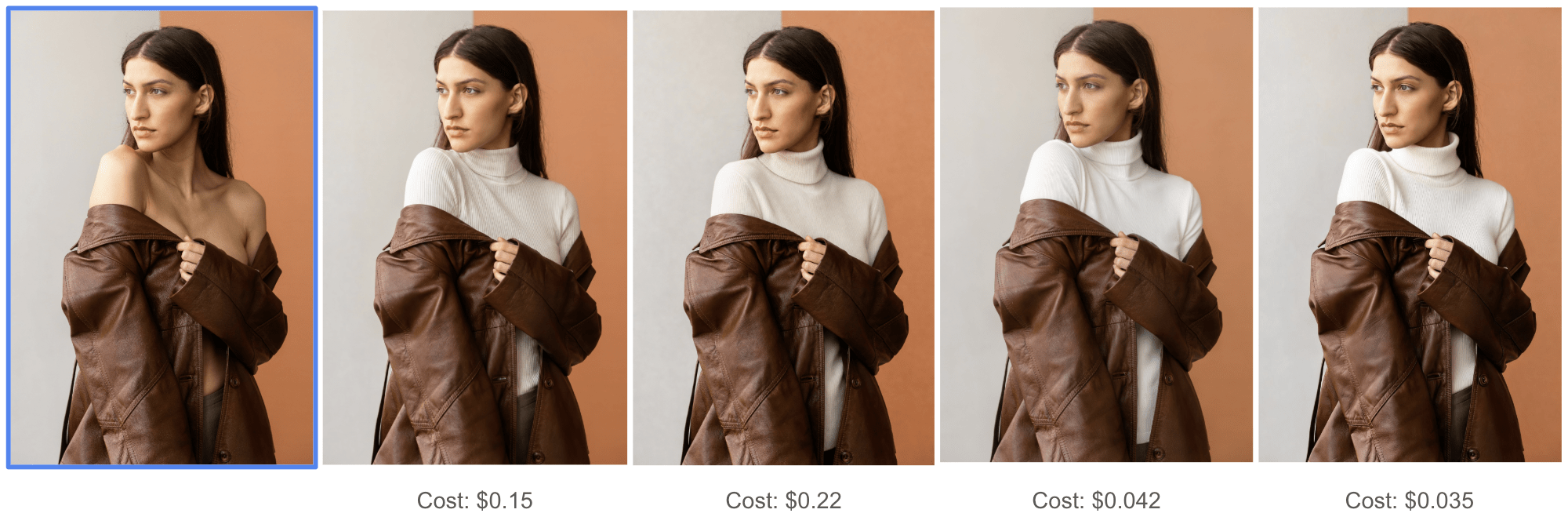
The objective of this editing task is to “add a white turtleneck under the coat” to the input image in the blue frame. The user’s goal was to reduce skin exposure for the advertisement of this coat, but the exact styling of the white turtleneck was secondary, since the coat was the target of the photo. In this scenario, all four models displayed here produced acceptable outputs for this task, at vastly different price-points spanning $0.035 – $0.22, a 6X price difference.
When model reasoning matters. And then there are the creative tasks where the user leans on a generative model for its reasoning ability, expecting a model to take a concept and run with it, making image edits that would otherwise have taken hours of manual editing to achieve using traditional tools. In these cases, where an understanding of the physical world, materials, and how people and objects move, can come in handy, and where we can see some of the image models pull significantly ahead in front of the others on the market.
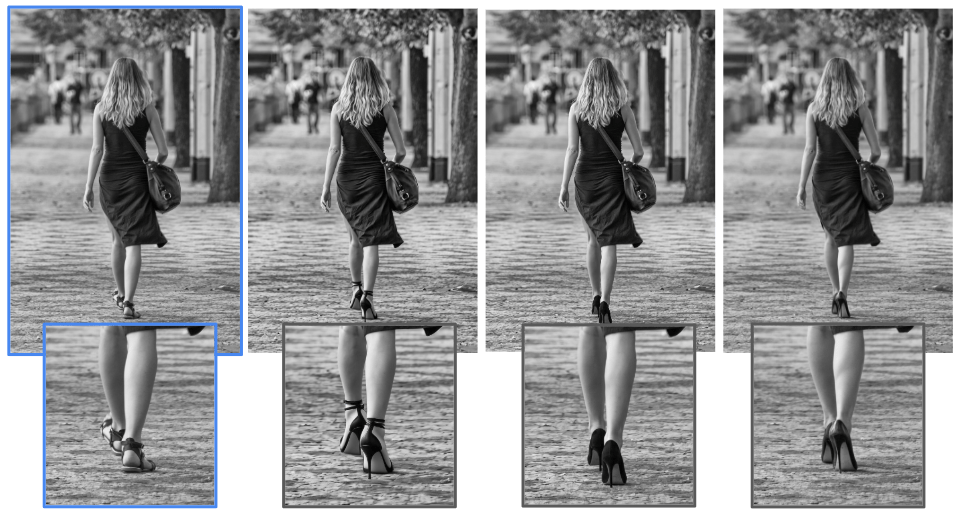
Many models performed similarly when asked to change out the sandals in the input image (blue frame) for another pair. But when asked to change out the sandals for heels, some models demonstrated their understanding of the impact of heels on a woman’s calf muscles, thereby generating more realistic outputs.
Finding the goldilocks middle. For many image editing requests, the range of possible acceptable outputs is large, particularly for requests with few constraints. In these cases, the best result depends critically on the user’s specific workflow and personal taste. If a model’s default output is built on the average taste of one set of users, it may be way off for another set of users. We see this divide particularly clearly when comparing the image quality judgements of a group of generalists to those of professional photographers.
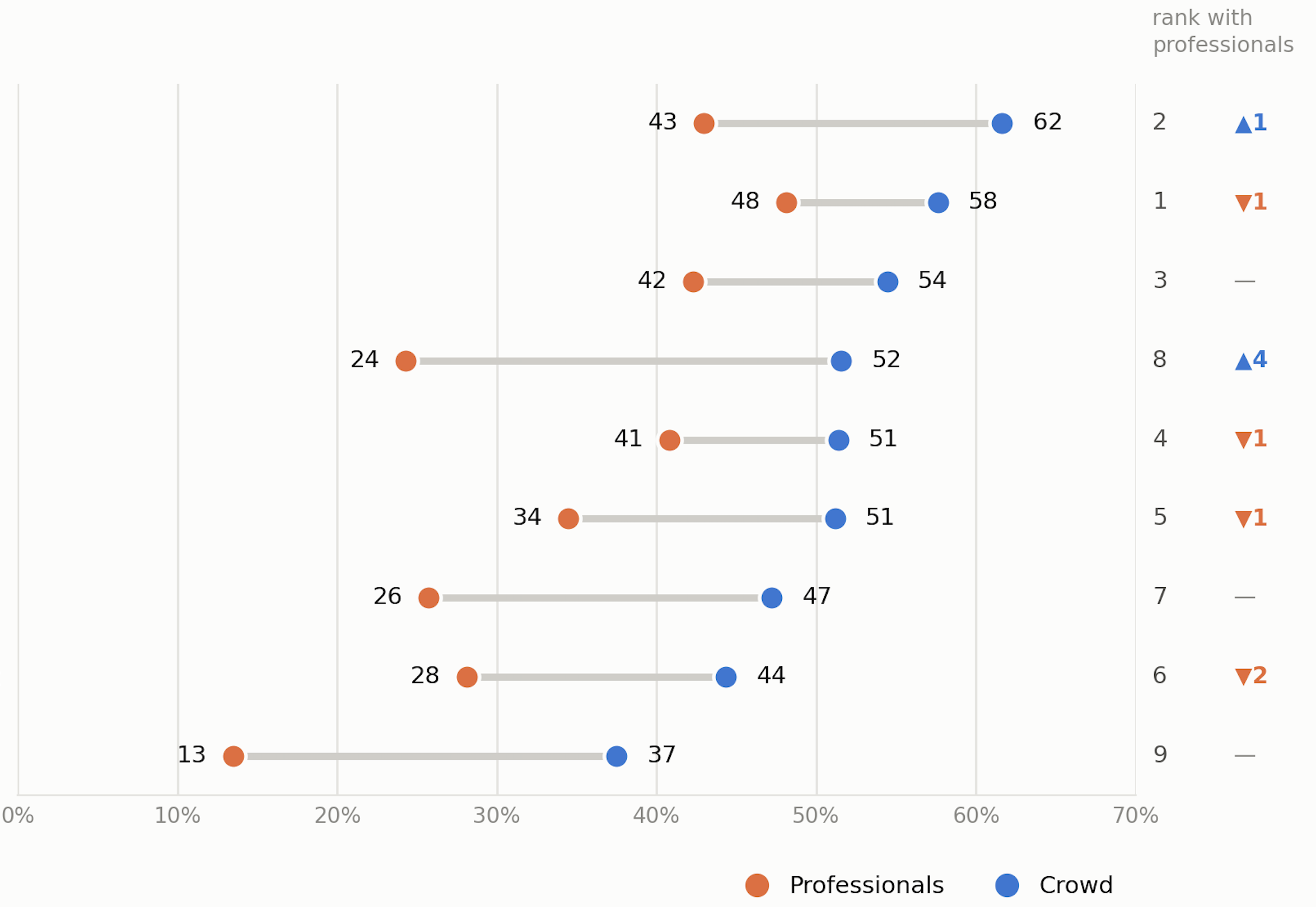
A selection of 9 anonymized image editing models evaluated on a diverse set of editing cases (each line corresponds to one of the nine models). The values plotted correspond to the % of images generated by each model, for the editing test cases, that were deemed “acceptable” by two different user groups: professional photographers and general online crowds. Professionals have different expectations for model outputs than crowds. Whereas a professional will rate a model result that changes too much of the original image as unacceptable, a non-professional will not see it as a problem. Optimizing a model for the preference of a crowd can make a model unusable by professionals. Note that these rankings are also editing task-dependent: different editing tasks will bring different models to the top of this chart.
Image editing is not solved. What the graph above additionally shows is that the average percent of images produced by models that have no visible problems is often less than 50% for most models. In fact, with professional needs in mind, this number drops further to 30%.When further evaluated on production readiness for real creative workflows, the total outputs that were deemed by professional photographers as ready to use out-of-the-box, with no additional edits, dropped to less than 17%, i.e., less than a fifth of image editing results across 9 different top models on the market were found to be production-ready.
At PIINC, we run dedicated evaluations and build custom leaderboards for different workflows and generative media use cases. Our evaluation strategy consists of customizing test sets, eval task designs, quality metrics, and annotator pools to different use cases. Just as different customer needs differ, so are the ways we evaluate whether those needs are met by models. If you would like to run a rigorous evaluation of generative media models tailored to your customer profiles, get in touch.
A full report with more examples and the identities of the models in this report revealed, is available by request.